
Motherboard
A motherboard is an important circuit board of a computer, which contains various components, such as Central Processing Unit(CPU), Read-Only Memory (ROM), memory expansion slots, serial ports, Universal Serial Bus(USB) ports, and Peripheral Component Interconnect(PCI) ports. In addition to these, it contains controllers, such as Integrated Device Electronics(IDE), Small Computer System Interface(SCSI), and Input/Output(I/O). These components and controllers control peripheral devices, such as the monitor, keyboard, mouse, hard disk drive, and Digital Versatile Disk(DVD) drive. Every hardware device directly or indirectly plugs into a motherboard for its functioning. Motherboards are manufactured by numerous organizations such as Intel, Foxconn, Asrock, and Tyan.
Let's explore the different components of the motherboard.
A motherboard refers to a multi-layer Printed circuit board(PCB) that holds and controls the components that are responsible for the processing of data. Fig 2.1 shows the various component names that the motherboard generally contains:
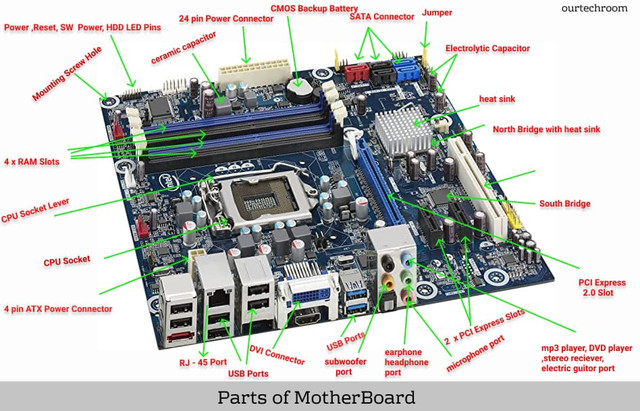
Fig: 2.1
In this section:
Processor Sockets/Slots
A motherboard can contain one or more sockets or slots to insert a processor. The socket type determines the type of processor used in a motherboard. The manufactures of sockets or slots define standards for the sockets or slots of a processor. Modern motherboards employ the Zero Insertion Force(ZIF) socket. In this type of socket, you use a socket lever to install and remove a processor in a motherboard. Intel-based motherboards use Socket 755(also known as Land Grid Array(LGA) 755 or Socket T) and support LGA 1155 which supports core i3, i5,i7 series processors.
Memory Sockets
A memory socket in a motherboard contains RAM. Generally, two types of memory sockets are available in motherboards- Single-In-Line Memory Module(SIMM) and Double-In-Line Memory Module(DIMM).
The memory sockets are:
- i. SIMM: Uses a 32-bit data path. You need to install at least two RAMs at a time for the functioning of a computer.
- ii. DIMM: Uses a 64-bit data path. You need to install only one RAM at a time for the functioning of the computer.
MotherBoard Chipsets
A motherboard chipsets controls data flow between a processor, RAM and cache, system buses, and peripheral devices. Modern motherboards consist of two distinct chipsets- Northbridge and Southbridge. The Northbridge chipset examines the communication and throughput speed between a processor, memory, and graphic card. The Southbridge chipset examines serial and parallel ports, USB support, and power management functions.
BIOS
BIOS, also called ROM BIOS, is a built-in software in ROM on your motherboard. BIOS performs Power On-shelf Test(POST) to determine whether hardware devices of a computer are working properly.
Clock Generator
A clock generator, also known as a clock signal, is a circuit that provides timing signals to control and coordinate various parts of a computer. Without proper synchronized signals, components of a computer may not work properly and a user does not get the output on time.
CMOS Memory Chips
The CMOS memory chip controls the real-time clock to maintain the date and time of your computer. This chip also includes a CMOS RAM that contains a BIOS setting. The CMOS chip gets power from a built-in battery on a motherboard. Some computers do not keep the accurate time due to a weak battery. Therefore, you need to replace the battery to maintain the accurate date and time of your computer.
Super I/O Controller
A super I/O controller, similar to the motherboard chipset, is a chipset that controls serial and parallel ports and floppy disk drive. Nowadays, motherboards have enhanced their super I/O controller in such a way that it even controls the real-time clock, keyboard, and IDE controller.
Expansion Slot
Expansion slots give additional functionalities to a computer. With the help of an expansion slot, you can add a video card and sound card to a computer to enhance the video and audio quality of the computer, respectively. The expansion slots rely on the form factor of a motherboard. In addition, a motherboard can have expansion slots of distinct shapes and sizes. Some popular categories of expansion slots are Industry Standard Architecture(ISA), Accelerated Graphics Port(AGP), Peripheral Component Interconnect(PCI), and PCI express(PCIe).
Power Connectors
A motherboard contains sockets to attach power connectors from the power supply. The MicroATX form factor motherboard uses 24-pin power to supply power to its components. Earlier, the ATX form factor motherboard came with the 20-pin power connector, but now it comes with the 24-pin power connector. The extra four-pin gives more power to the motherboard.
Voltage Regulators
A voltage regulator is a device that maintains a constant flow of current and voltage in a motherboard and its various components. A voltage regulator is used when voltage varies more than the tolerance level of electrical equipment of the motherboard. A voltage regulator conveys voltage from the power supply and transforms it into the voltage required by a processor, memory, chipset, and other circuits.
Capacitors
A capacitor is an electrical device that stores energy in the form of an electrical field to provide a constant power supply to various components of a motherboard. Nowadays, many motherboard manufacturers have reduced the number of capacitors on the motherboard. In addition, they have started using low-quality capacitors, which provide an irregular flow of power supply of the components of a motherboard. ultimately reducing the life of the motherboard. Therefore to overcome this sort, you must purchase branded motherboards.
Batteries
Every PC has a low-power battery to preserve certain information, such as CMOS settings, current date and time, and resource settings for plug and play devices when power is off. Nowadays, the motherboard contains coin-shaped batteries which are made of lithium/manganese-oxide.
Keyboard and Mouse Connectors
Keyboard and Mouse connectors completely rely on the form factors of a motherboard. Most PCs use a pair of small 6-pin connectors for the keyboard and Personal Systems 2(PS/2) mouse. The motherboard holds these connectors in its back edge. Earlier PCs with the AT form factor use a large 5-pin keyboard connector. These PCs did not have a mouse port connector and use serial ports for the mouse.
Jumpers
A jumper refers to a small metal connector with a plastic cover that connects two metal pins with each other. It is located in Jumper Block. Jumper blocks are usually maned as JP1, JP2, and JP3 in a motherboard
A jumper can hold more than one setting. For example, suppose a motherboard has a jumper block with three pins labeled 1, 2, and 3. The jumper can be placed over pins 1 and 2 for one setting or pins 2 and 3 for a different setting.
You can put the jumper over a single pin in the jumper block rather than placing it in an isolated place if it is not in use. However, placing the jumper over a single pin does not allow anything, but keeps the jumper safe convenient for future use.
Ports and headers
Ports are termed as connection points that link cables and devices to a motherboard. Nowadays, motherboards have integrated mouse and keyboards connectors as well as serial and parallel ports. Some common ports in a motherboard are:
- Serial port
- Parallel port
- PS/2 mouse port
- USB port
- Infrared (IR) port
- Primary and secondary IDE/ATA hard disk drive interfaces
- SATA interface
Pin connectors
A motherboard contains many pin connectors that are used to connect to LEDs, indicators, and switches. These connectors vary according to the form factor of the motherboard.
- Power switch
- Reset switch
- IDE/ATA hard disk drive activity LED
- Case speaker
- CPU fan
- Suspend mode switch
- Suspend mode LED
Power Switch
The ATX computer has a connector that connects the power switch of the computer case to a motherboard using wires. When you press the switch, a signal is sent to the motherboard to turn on the computer.
Reset Switches
A reset switch is a two-pin connector that connects the reset button located in a computer case to the motherboard to reboot the computer without turning the power off.
IDE/ATA or SATA Hard Disk Drive Activity LEDs
The IDE/ATA or SATA hard disk drive activity LED is a 2-pin connector that lights the LED when the motherboard detects some activities on any of the IDE or SATA hard disk drives of a computer. Some motherboards have 3 or 4-pin for this connector. You need to check your motherboard manual to verify whether the motherboard 4-pin, 3-pin, or 2-pin connector.
Case Speaker
It is a small speaker that is fixed on the motherboard. This speaker provides a beep sound when some errors occur on a computer. A case speaker uses 4-pin connectors.
CPU Fans
Motherboards have a 4-pin connector to supply power to the fan of a processor. You need to connect the fan cable to the fan connector on a motherboard.
Suspend Mode Switches
A suspend mode switch connected with a 2-pin connector, puts a computer into a suspended mode. In the case of newer computers, the turbo button is used for this function.
Suspend Mode LEDs
In some computers, the suspended mode lights the LED-lit whenever a computer enters the suspended mode. You have learned about the different components of a motherboard. But don't try to open the motherboard as the components of the motherboard are very sensitive, it can easily get damaged.