Ports
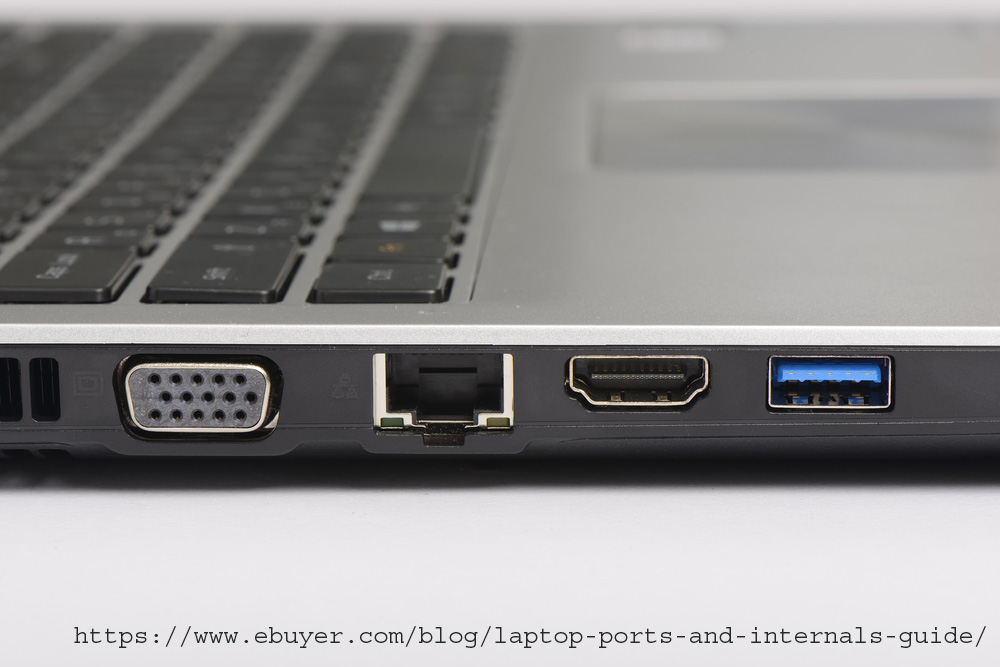
Have you ever wonder which port is used for what purpose. There are so many holes of different shapes in a computer or a laptop. So I am going to explain which hole I mean ports is used for what purpose ;).
LAN port
Let's talk about the LAN port. The LAN port or the ethernet port is used for wired internet connection which uses a LAN(Local area network) cable. But some computers do not have these LAN ports because it is a very bulky port which makes the laptop thicker. So these ports are not in-build in many computers. So if you don't have a LAN port on your machine, you can use a USB Network Adapter.
USB Network Adapter
VGA port
VGA Port
VGA(Video Graphics Array) port is used for display devices and is used to connect to a computer or a laptop to a monitor, projector, or TV using the VGA cable.VGA is an analog and video interface.
HDMI Port
HDMI Port
HDMI(High Definition Multimedia Interface) port is used to receive and transmit both audio and video signals from an array of source devices through to a number of display monitors. That means, we can use HDMI cable to transmit both audio and video to a secondary screen.
Difference between VGA and HDMI
VGA is an analog interface while HDMI is a digital interface. VGA is a video interface which means we can only use it for video transmission while HDMI includes both the audio and video. Devices with the VGA interface have lower video resolution compared to modern HDMI devices. Also, VGA ports are very bulky.
USB-C Port
USB-C Port
Many computers don't have this type of port, it is mainly used in Apple computers. It features a new, smaller connector shape that's reversible so it's easier to plug in. USB-C cables can carry significantly more power, so they can be used to charge larger devices like laptops. They also offer up to double the transfer speed of USB 3 at 10 Gbps.
Security Slot
Security Slot
Have you ever notice an oval hole in the corner of the laptop. I had no idea that it was a security slot I thought it was a keychain holder. But then I found that it was a security slot also called Kensington lock which uses a Kensington cable to lock the laptop to a table or a chair.
USB Port
USB Port
The USB interface connects low-speed external devices, such as keyboard, mouse, hard disk drive, and scanner as well as high-speed external devices, such as digital cameras and mobile phones. By using a common USB interface, you can connect up to 127 devices at a time. This interface transfers data at the speed of 480MB/s.